Features for ADO.NET Entity Framework
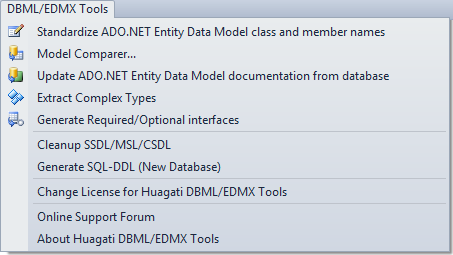 Huagati DBML/EDMX Tools adds a new dropdown menu to Visual Studio's menu bar
The
Model Comparer* for Entity Framework 4 compares the database, the SSDL (storage) layer of the model, and CSDL (conceptual) layer of the model and presents differences between the database and model layers in easy-to-overview ways. It allows differences to be synchronized across the layers selectively, updating only the portions of the model selected by the user while leaving other portions of the model untouched and intact.
The Model Comparer also detects and can correct SSDL <=> CSDL differences that are caused by changes done in the VS2010/VS2012/VS2013 EF designer or by Visual Studio's built-in wizards, e.g. changes in data type/maxlength/precision & scale/store generated pattern/default value etc are now a breeze to detect and bring in sync in the other layers.
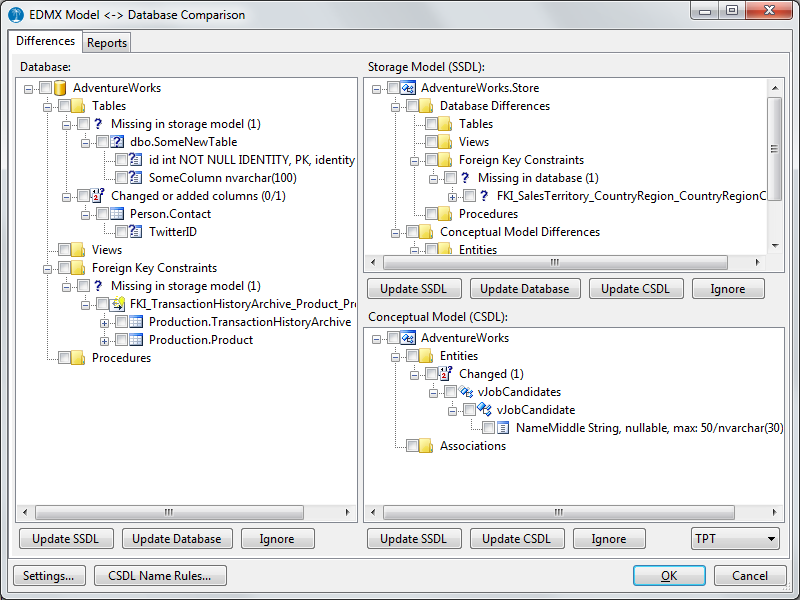 The Model Comparer for EFv4 shows differences between the database, SSDL, and CSDL layers and allows individual differences to be synchronized or left in place.
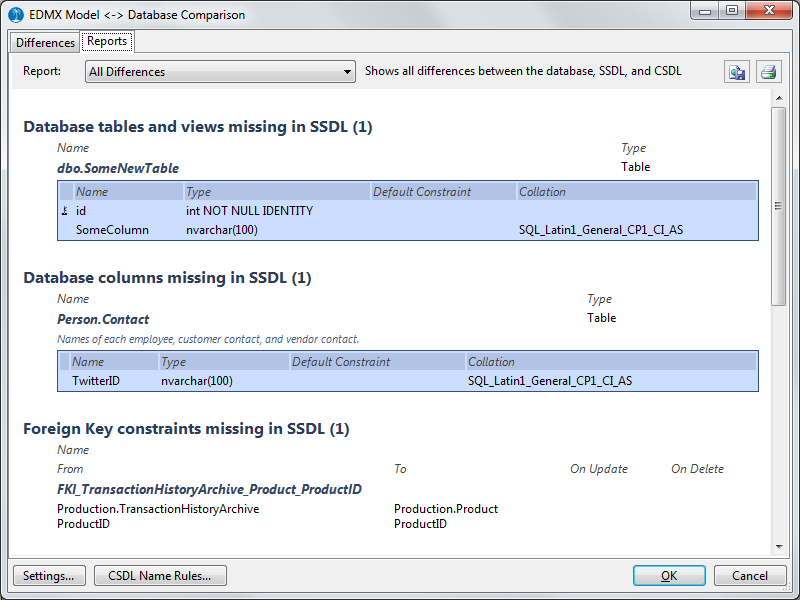 The Model Comparer's report view shows database <=> SSDL <=> CSDL differences in report form. Reports can be printed or saved as HTML files.
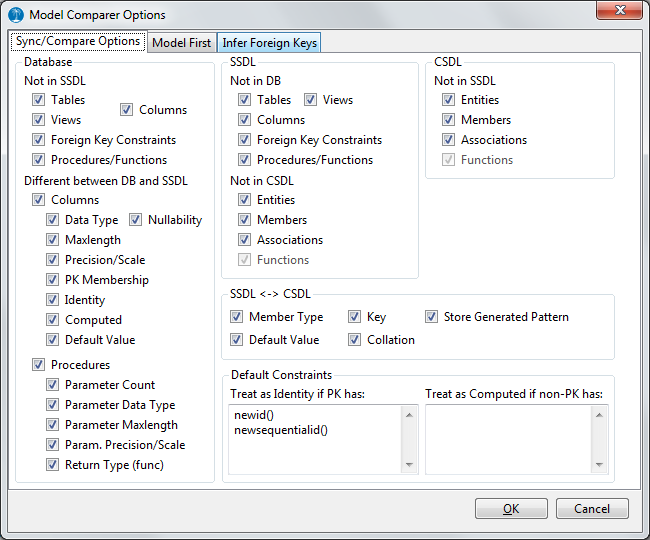 The Model Comparer allows certain types of differences to be included or excluded in the comparison, and allow database default constraints to be mapped against Entity Framework's StoreGeneratedPattern values.
For model-first scenarios, the Model Comparer support generating mappings and tables for all three inheritance types supported by Entity Framework 4;
TPT, TPH, and TPC. It can also make some common transformations on entity and member names when generating storage layer entities from the conceptual model.
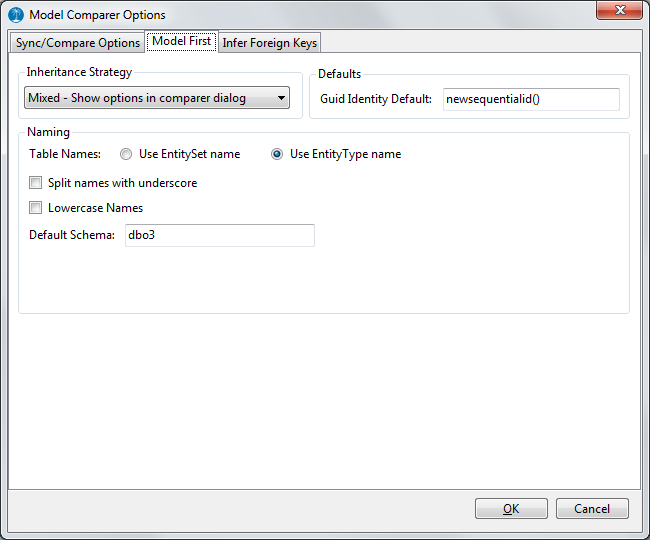 Model first options in the Model Comparer's settings dialog.
The Model Comparer can also
infer foreign key constraints if some or all foreign keys are missing in the database. Inferred foreign key constraints can be added to the model as entity-associations without having to be added to the database, allowing navigation properties between entities even if some or all foreign keys are missing.
 The Model Comparer's foreign key constraint inference options.
EDMX file wrapper library
The Model Comparer's foreign key constraint inference options.
EDMX file wrapper library: The add-in uses a sophisticated
wrapper library, HuagatiEDMXTools, that puts an object model on top of the EDMX, giving easy programmatic access to parsing, creating, modifying and updating EDMX files. This library can be used by licensed users of the add-in for homegrown tools built on top of the EDMX files.
Standardize ADO.NET Entity Data Model class and member names renames ADO.NET Entity Framework designer diagrams and generated classes:
- Remove/add prefixes/suffixes, e.g. remove leading tbl_, int_, str_
- Use TitleCaseNames for classes and properties if the database names are all lowercase
- Remove underscores_in_names
- Control pluralization/singularization
- Use regular expressions in addition to built-in naming rules
- Plug in custom pluralization / singularization or custom name rule code
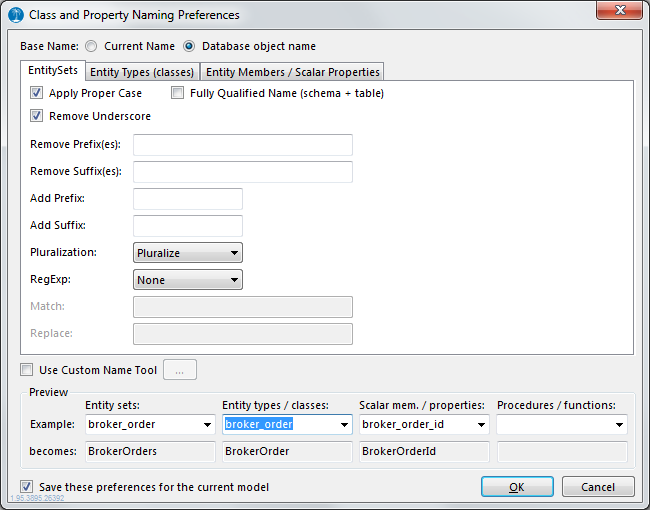 The renaming options dialog gives the user control over what naming rules to use when mass-updating class- and property names.
Generate complex types
The renaming options dialog gives the user control over what naming rules to use when mass-updating class- and property names.
Generate complex types* can generate complex types, grouping commonly occuring entity members together in types reused across all entities sharing the same members.
 The Model Comparer allows certain types of differences to be included or excluded in the comparison, and allow database default constraints to be mapped against Entity Framework's StoreGeneratedPattern values.
Update ADO.NET Entity Data Model documentation from database
The Model Comparer allows certain types of differences to be included or excluded in the comparison, and allow database default constraints to be mapped against Entity Framework's StoreGeneratedPattern values.
Update ADO.NET Entity Data Model documentation from database retrieves free-text table and column descriptions, and index definitions from the database and updates the xml documentation fields in the EDMX designer with the descriptions.
SQL Server 2000, 2005 or 2008 (any edition) is required for the update documentation feature.
Cleanup SSDL/MSL/CSDL** detects unmapped entityset/entitytype definitions in the SSDL and CSDL portion of EDMX files and presents a summary of those inconcistencies along with options for removing unmapped entitysets/types and associations/foreign keys linked to them, or to recreate them in the opposite layer of the EDMX file (CSDL / SSDL), and to create new mappings.
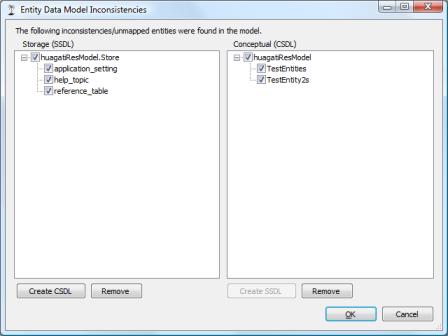 The cleanup dialog will list unmapped entitysets/types in the conceptual (CSDL) layer, and storage (SSDL) layer of the EDMX file and has options for removing or re-creating corresponding entity sets/types in the layer where it is missing.
Generate DDL (New Database)
The cleanup dialog will list unmapped entitysets/types in the conceptual (CSDL) layer, and storage (SSDL) layer of the EDMX file and has options for removing or re-creating corresponding entity sets/types in the layer where it is missing.
Generate DDL (New Database)** generates SQL-DDL for generating a new database from the SSDL (storage) portion of an EDMX file, including tables, primary keys, foreign keys, and indexes corresponding to foreign keys.
Generate Required/Optional interfaces adds member properties to all entity classes, providing quick and easy access to required (non-nullable) vs optional (nullable) members.
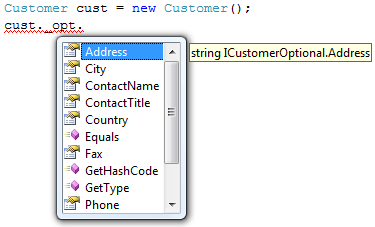
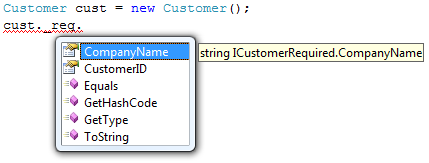 After using the optional/required interface generation add-in feature on an Entity Framework model, all entity classes have new _opt/_req properties providing access to optional and required members respectively.
* = The 'Model Comparer' and 'Complex Type Generator' are available for EFv4 models under Visual Studio 2010, 2012, and 2013.
** = The 'Cleanup SSDL/MSL/CSDL' and 'Generate DDL' options has been superseded by the Model Comparer under Visual Studio 2010 and 2012, but are available under both VS2008 and VS2010 for backwards compatibility.
After using the optional/required interface generation add-in feature on an Entity Framework model, all entity classes have new _opt/_req properties providing access to optional and required members respectively.
* = The 'Model Comparer' and 'Complex Type Generator' are available for EFv4 models under Visual Studio 2010, 2012, and 2013.
** = The 'Cleanup SSDL/MSL/CSDL' and 'Generate DDL' options has been superseded by the Model Comparer under Visual Studio 2010 and 2012, but are available under both VS2008 and VS2010 for backwards compatibility.